
How To Videos
How to Add Widgets to the Coporate Dashboard in FranchiseSoft?
1. Click on the green “Add Widget” button in the upper right-hand corner.
2. This will display a pop-up window.
3. Fill in all details.
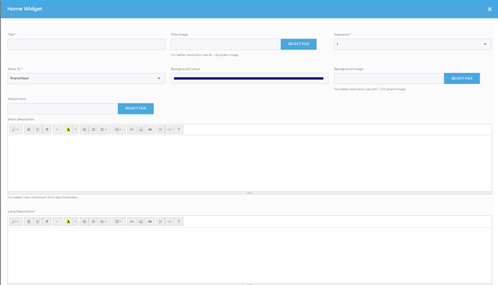
- Title – this will not display for users
- Image – add an image to be the background for this widget
- Sequence – the order in which you want this widget to appear
- Show to – can choose Franchisor, Franchisee or both
- Background colour – if no image is selected next, the widget will be this colour
- Background Image – add a background image if appropriate
- Attachment – can be added if appropriate
- Short description – the text that will appear on the widget
- Long description – the text that will appear when a user clicks on the widget
4. Click the green “Submit” button in the bottom right-hand corner once completed.
For More Details: https://app.franchisesoft.com/knowledge_base/article_detail/92
If you would like a DEMO of the software, kindly visit https://franchisesoft.com/ and request a Demo.
BackHappy Customers
A True Partner in Franchise Development
FranchiseSoft has been our go to solution for document management, tracked correspondence to our network, and tools to power our Franchise Development with segmentation, automation, and communication processes to take the heavy lifting off our plate. They have been a
fantastic partner in the Franchise space! Leigh Feldman CEO - Youth Franchise Brands
Why I love FranchiseSoft’s Sales CRM?
FranchiseSoft is an easy to use, afforfable and powerful CRM. It makes the FD Process a great experience for our candidates and for our team.
 Paul Pickett Chief Development Officer Wild Birds Unlimited
How FranchiseSoft delivered 100 Franchise Agreements in 2 years for Brusters Ice Cream?
It helps us communicate a consistent message and establish realistic expectations with our franchise candidates. I couldn’t do my job without this outstanding platform and their responsive customer service!
 Kim Ellis Vice President of Franchise Development & Legal at Bruster’s Real Ice Cream
How Moran Family of Brands shifted into High Gear switching to FranchiseSoft!
Using FranchiseSoft Franchise Sales CRM for 3 years. Its very user friendly and very robust, the team is easy to work with and very supportive. Making the transition was a good decision for our franchise system!
 Pete Baldine President, Moran Family of Brands
Our Franchise Clients















































Get an Inside Look
With all these key components packaged into an all-in-one system, it’s no surprise that FranchiseSoft is considered the best franchise management CRM in the market.
Ready to see FranchiseSoft for yourself? Fill out the Demo Request form to schedule an inside look at our franchise management software.

Pre-recorded Demo