
How to Create NACHA Files for Royalty Processing with a Franchise Management System
Are you looking for a 21st century solution to franchise royalty payment processing?
Why not join millions of other businesses and leverage the payment power of the ACH network for faster, safer, and more efficient royalty processing?
Today’s post runs down the value of this practice and explains how to effortlessly create the prerequisite NACHA files needed to automate your royalty processing.
What Is Automated Clearing House (ACH)?
You may not be too familiar with the acronym, but chances are you’ve used ACH.
When your franchise employees wake up on a Friday and see that their pay is automatically deposited into their bank account, that’s ACH in action.
When you pay a vendor online and save yourself the hassle of writing and mailing a check (or better yet, set up a recurring payment to automatically transfer payment on a set schedule), that’s ACH at it again.
These are just some of the ways that America’s 750,000+ franchisors use ACH, known sometimes as Direct Deposit, direct pay, or electronic check, use ACH to make life easier. According to the NACHA website, ACH moved more than 23 billion electronic payments in 2018, making it one of the world’s safest, largest, and most reliable payment systems.
ACH is used to pay salaries, mortgage payments, car insurance, franchise royalties, and even tax refunds–in fact, the IRS website calls ACH “the best and fastest way to get your tax refund.”
Why Use Ach For Franchise Royalty Processing?
- Faster payment. Using NACHA files to make direct payments via ACH is much faster than payment alternatives. Not only does the payee receive their money sooner, but you save countless labor hours that would otherwise be squandered writing checks and fussing with different payment gateways.Same-day payment options are available, and they’re improving every day. Same Day ACH was first launched in 2016, enabling complete end-to-end transactions via credit and debit on the day they’re sent. In 2020, the dollar limit per Same Day ACH transaction will quadruple from $25,000 to $100,000, and in 2021, financial institutions will be able to submit Same Day ACH transactions two hours later on each business day.
- Make payments or receive payments on the go. Why confine your payment capabilities to a single desktop computer or cubicle space? With our franchise management system, you can make or collect ACH payments from any mobile device with the click of a button.
- Enhanced security/confidentiality. ACH payments pass through fewer hands than paper checks or cash, making them much safer and more confidential than other methods. The ACH network is also the number-one choice for important government payments, like social security benefit payments and tax refunds.Also, with an ACH payment, you can also see exactly when your payment was received, which makes for easier backtracking and liability coverage in the event that money is misplaced or miscommunications occur.
- All-in one electronic payment solution. In addition to helping your royalty processing, the ACH network can be used to pay salaries, mortgages payments, car insurance, tax refunds, and even make donations to your favorite charities.
- Fewer payment errors. Not only do automated ACH payments free up hours in the day; they also lower the risk of human error on both sides of the equation. For the client, that means no more forgetting to sign the check or entering the wrong amount. For employers, that means no miscalculations or payment oversights to worry about.
- Hands-free payment capabilities. Franchisors can set up recurring payments each month by date or event triggers to ensure that nobody is ever left waiting for their money ever again. This means better brand trust and reputation, happier clients and employees, and fewer pay-related productivity freezes, all while you eliminate some extra administrative “busywork” from your to-do list.
Create Flawless Nacha Files With Your Franchise Management System
If you want to unlock the benefits of the ACH network for your royalty processing, you’ll need to create the appropriate NACHA files first.
NACHA files are used to execute domestic ACH payments through the Automated Clearing House Network (ACH). At the most basic level, a NACHA file carries payment instructions that get sent or uploaded to the bank portal to “give permission” to execute a mass payment batch.
It’s possible to create these files manually, but most financial institutions and banks automate the process with advanced software.
If that’s your plan, you’d better make sure your franchise management system is up to the task. NACHA files must follow precise formatting stipulations. While the details vary from one bank to another, most follow a series of Standard Entry Class Code (SEC codes) to be accepted.
If you’re curious, here’s what a portion of a NACHA file might look like:
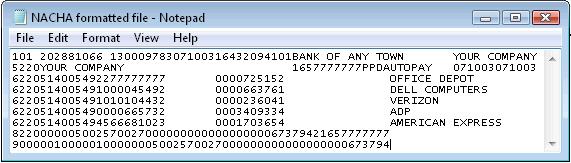
Looks fun, right?
Unless your franchise management system can simplify things, you’re in for a long and frustrating process. Most big companies don’t bother, accepting that manual NACHA file assembly is ultimately not worth the time and effort that’s required to get the job done right.
NACHA file mistakes mean broken workflow, angry clients, disillusioned workers, and, in some cases, banking fees to pay. Setting up new users, leveraging different payment types, and integrating with new banking portals are just a few of the challenges you’ll face in creating error free NACHA files.
Fortunately, ERP software can generate these sensitive and highly technical files for you. And since FranchiseSoft is built by and for franchisors, we know exactly how to tailor these files for flawless royalty processing.
FranchiseSoft’s franchise management software allows users to effortlessly create NACHA files based on specific fee settings you create. Download the NACHA file, upload it to your banking institution, and let them take care of debiting your franchisee’s accounts and crediting yours.
Free Franchise Management System Walkthrough
Want to learn more about our franchise management system and maybe see some NACHA files generated in real time?
Visit the FranchiseSoft website or call 866-311-7189 to book a free consultation with our team. There is no cost, no obligation to buy, and no sales pressure. We just want to explain what we designed our software to do, how it can help, and why you’ll never go back to “traditional” payment options.
Back


















































Get an Inside Look
With all these key components packaged into an all-in-one system, it’s no surprise that FranchiseSoft is considered the best franchise management CRM in the market.
Ready to see FranchiseSoft for yourself? Fill out the Demo Request form to schedule an inside look at our franchise management software.

Pre-recorded Demo